








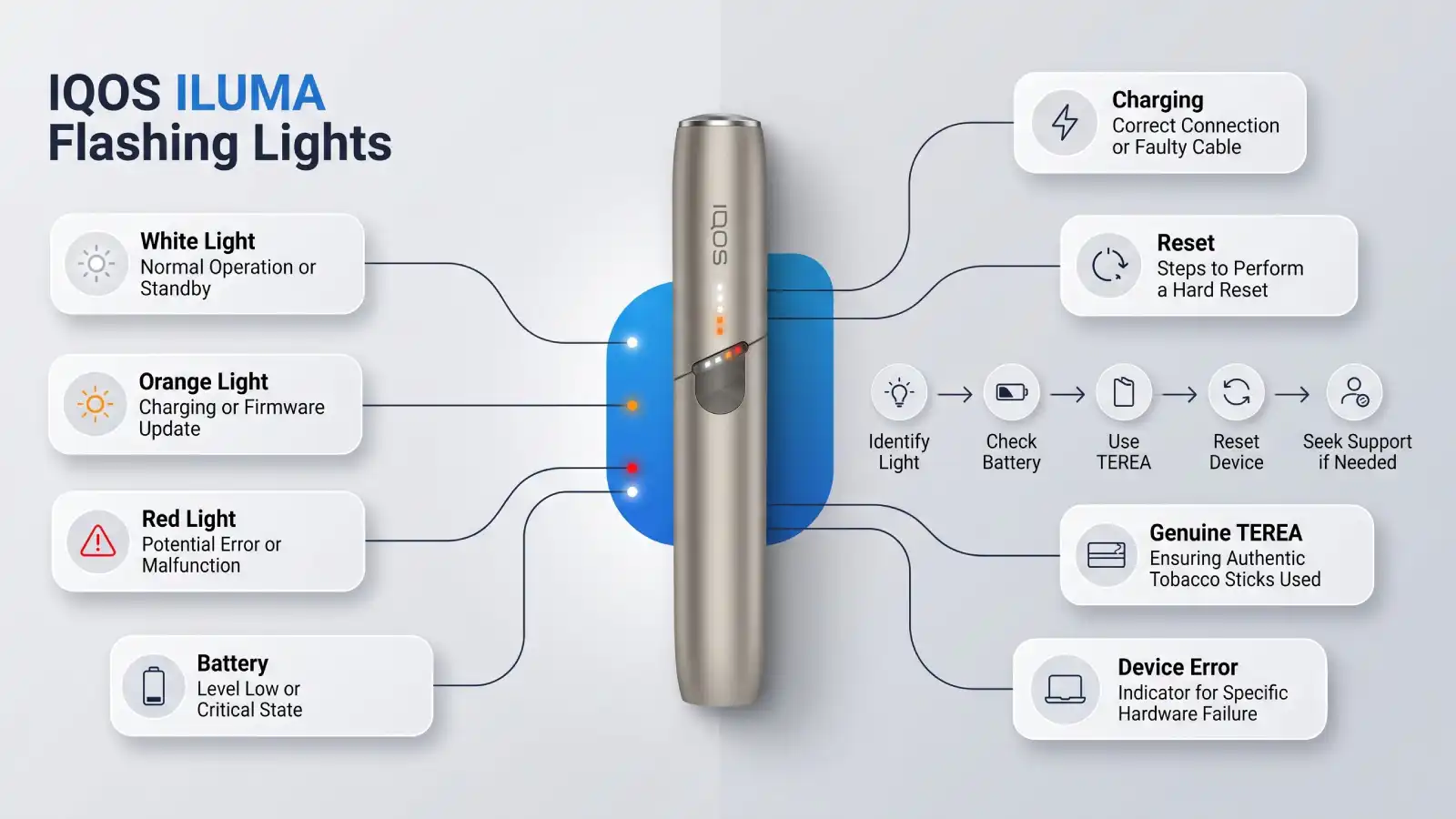
If your IQOS ILUMA is flashing unexpectedly, don’t panic. Flashing lights are the device’s way of communicating its status or alerting you to an issue. Whether it’s a white blinking light, orange indicator, or the holder won’t start heating, understanding these signals can help you quickly identify the problem.
This guide explains the most common IQOS ILUMA flashing light issues, what they mean, and the practical steps you can take to troubleshoot your device. If you’re an adult IQOS user in Dubai, UAE, this article will help you get back to using your device with confidence.
Why Does IQOS ILUMA Flash?
IQOS ILUMA uses LED indicators to display information about:
- Battery level
- Charging status
- Heating process
- Device temperature
- System errors
- Firmware or hardware issues
In most cases, a flashing light does not indicate permanent damage. Many issues can be resolved with simple troubleshooting.
Understanding IQOS ILUMA Flashing Light Meanings
White Flashing Light
A white flashing light usually indicates one of the following:
- The device is starting up.
- The holder is preparing to heat a TEREA stick.
- The battery is charging.
- The device is restarting after a reset.
If the white light continues flashing for an unusually long time, try restarting the device or checking the battery level.
Orange or Amber Flashing Light
An orange flashing light often suggests the device requires attention.
Possible reasons include:
- Device error
- Charging problem
- Temperature protection
- Internal system issue
If this occurs, allow the device to return to room temperature and perform a reset before using it again.
Red Flashing Light
A red flashing light may indicate a more serious issue, such as:
- Battery malfunction
- Device fault
- Charging failure
- Hardware error
If a red light persists after charging and resetting the device, professional inspection or replacement may be necessary.
IQOS ILUMA Won’t Heat and Keeps Flashing
If your device flashes but doesn’t start heating, check the following:
1. Make Sure You’re Using TEREA Sticks
IQOS ILUMA works only with genuine TEREA tobacco sticks.
Using HEETS or other incompatible sticks will prevent proper operation.
2. Check Battery Charge
Low battery is one of the most common reasons the device won’t heat.
Charge both the pocket charger and holder fully before trying again.
3. Reinsert the TEREA Stick
Remove the tobacco stick carefully and insert a fresh TEREA stick correctly.
Avoid forcing the stick into the holder.
4. Restart the Device
A simple reset can resolve many temporary software issues.
After resetting, wait a few moments before attempting another session.
How to Reset IQOS ILUMA
If your IQOS ILUMA is flashing continuously, a reset is often the first troubleshooting step.
General reset process:
- Place the holder inside the pocket charger.
- Press and hold the charger button for several seconds.
- Wait until the device lights blink.
- Release the button.
- Allow the device to restart completely.
Once the reset finishes, try using the device again.
Common Reasons IQOS ILUMA Flashes
| Issue | Possible Cause | Suggested Solution |
| White flashing | Starting or charging | Wait until ready |
| Orange flashing | Temporary system issue | Reset the device |
| Red flashing | Battery or hardware problem | Charge fully or seek support |
| Won’t heat | Wrong tobacco stick | Use genuine TEREA |
| Flashing while charging | Battery charging normally | Allow full charge |
| Continuous flashing | Software issue | Restart the device |
Tips to Prevent IQOS ILUMA Errors
Following good device care can help reduce flashing light issues.
Use Genuine TEREA Sticks
Only TEREA tobacco sticks are designed for IQOS ILUMA’s SMARTCORE INDUCTION SYSTEM™.
Charge Regularly
Avoid letting the battery remain completely discharged for long periods.
Keep the Device Dry
Protect the device from water, excessive humidity, and liquid exposure.
Avoid Extreme Temperatures
Very hot or cold environments may temporarily affect device performance.
Allow the device to return to normal temperature before use.
Handle the Holder Carefully
Although IQOS ILUMA eliminates the heating blade found in previous models, the holder should still be handled with care to maintain long-term performance.
When Should You Replace Your IQOS ILUMA?
Consider replacing or seeking professional assistance if:
- The red light continues after multiple resets.
- The device no longer charges.
- The holder never heats despite using genuine TEREA.
- The charger fails to recognize the holder.
- Flashing lights continue after full charging and troubleshooting.
Persistent issues may indicate a hardware fault that cannot be resolved through basic troubleshooting.
IQOS ILUMA Support for Users in Dubai, UAE
If you’ve completed the troubleshooting steps and your device still isn’t functioning correctly, it’s best to seek assistance from an authorized IQOS service provider or retailer.
When purchasing replacement devices or genuine TEREA sticks in Dubai, always choose trusted retailers to ensure authenticity and compatibility.
Frequently Asked Questions
Why is my IQOS ILUMA flashing white?
A flashing white light usually indicates the device is starting, charging, or preparing for a heating session. If it continues for an extended period, try resetting the device.
Why is my IQOS ILUMA flashing red?
A red flashing light often points to a battery, charging, or hardware issue. Fully charge the device and perform a reset. If the problem persists, professional support may be required.
Can using HEETS cause IQOS ILUMA to flash?
IQOS ILUMA is designed exclusively for TEREA tobacco sticks. Using incompatible tobacco sticks such as HEETS can prevent normal operation.
How do I reset IQOS ILUMA?
Place the holder in the charger, press and hold the charger button until the LEDs blink, then release the button and allow the device to restart.
Why won’t my IQOS ILUMA heat?
Common reasons include a low battery, incompatible tobacco sticks, an incorrectly inserted TEREA stick, or a temporary device error.
Does IQOS ILUMA need cleaning?
IQOS ILUMA’s blade-free induction heating system significantly reduces tobacco residue compared to earlier IQOS models, so it generally requires less maintenance. However, keeping the exterior clean and dry is still recommended.
Where can I buy genuine TEREA sticks in Dubai?
Purchase genuine TEREA tobacco sticks from trusted retailers to ensure compatibility with IQOS ILUMA and reliable product quality.
Conclusion
If your IQOS ILUMA flashing light has you concerned, the issue is often easier to resolve than it appears. Flashing LEDs usually indicate charging status, heating progress, or temporary system notifications rather than permanent damage.
Start by checking your battery level, confirming you’re using genuine TEREA sticks, and performing a device reset. These simple steps solve many common problems. If flashing continues—especially with persistent red lights or charging failures—it may be time to contact an authorized service provider.
For adult IQOS users in Dubai, using authentic IQOS ILUMA devices and genuine TEREA tobacco sticks helps ensure reliable performance and minimizes compatibility issues. Best Terea Shop UAE offers a wide selection of authentic TEREA flavors and IQOS-compatible products to help you get the most from your device.